
A code reviewer for C# that refuses a push when the code breaks a rule your team wrote.
CommitFence runs before the push, builds what the push touches with your own compiler, and judges it against the rules in commitfence.json and in your .editorconfig. A rule that blocks stops the push, with the file, the line and the reason.
$ commitfence review --push
Version 1.0.0.0 · 23 November 2026 · What's new · Free and open source, no account
$ commitfence review --pushsrc/Shop/Invoice.cs(7,9): error TEAM010: No braces around a single-line ifsrc/Shop/Invoice.cs(5,17): warning CA1822: Member 'IsOverdue' does not access instance data and can be marked as static [Shop, net11.0]src/Shop/Invoice.cs(7,28): error TEAM012: Use IClock, not DateTime.NowShop (net11.0): reviewedrefs/heads/main: 3 changed files. Rule files changed: .editorconfig, commitfence.json. 2 changed files of no known language were not looked at. 1 of 1 files reviewed, 1 of 1 builds checked: 2 blocking, 1 warning.exit code 1Real output of commitfence review --push for the scratch repository of the Quick start. The hook runs the same review before the push leaves.
- Open source, MIT licence
- No account
- Judges only what the push touches
- A command line and an app
Two faces
The command line stops the push. The app writes the rules.
Both read the same commitfence.json. The command line is what the pre-push hook runs; the app is where you write and try rules and read a review.
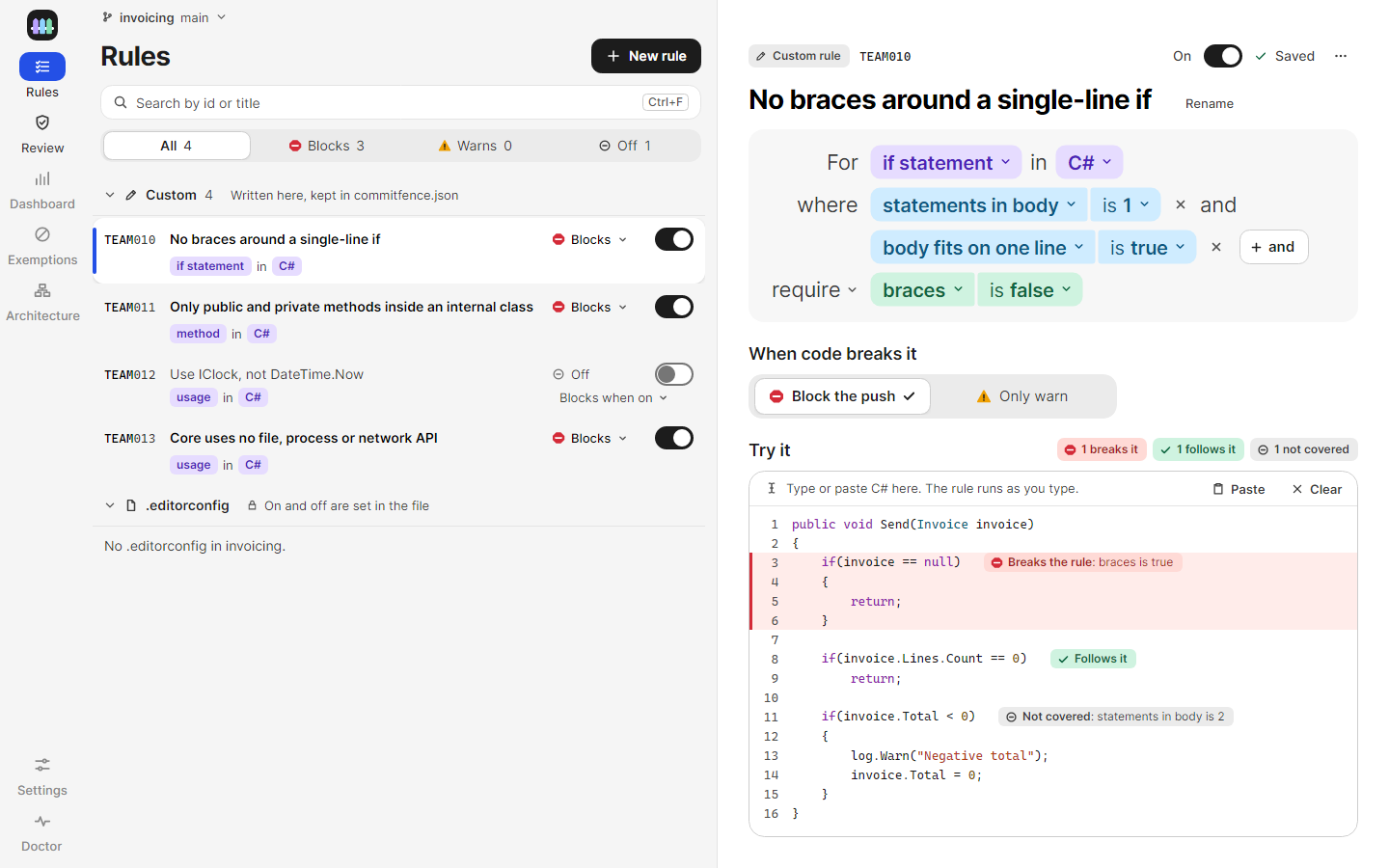
The rules
The team's rules and the rules of .editorconfig, each as a sentence you can edit. Try it, under the rule, runs it on code you type or paste and marks each place that breaks it, follows it or is not covered.
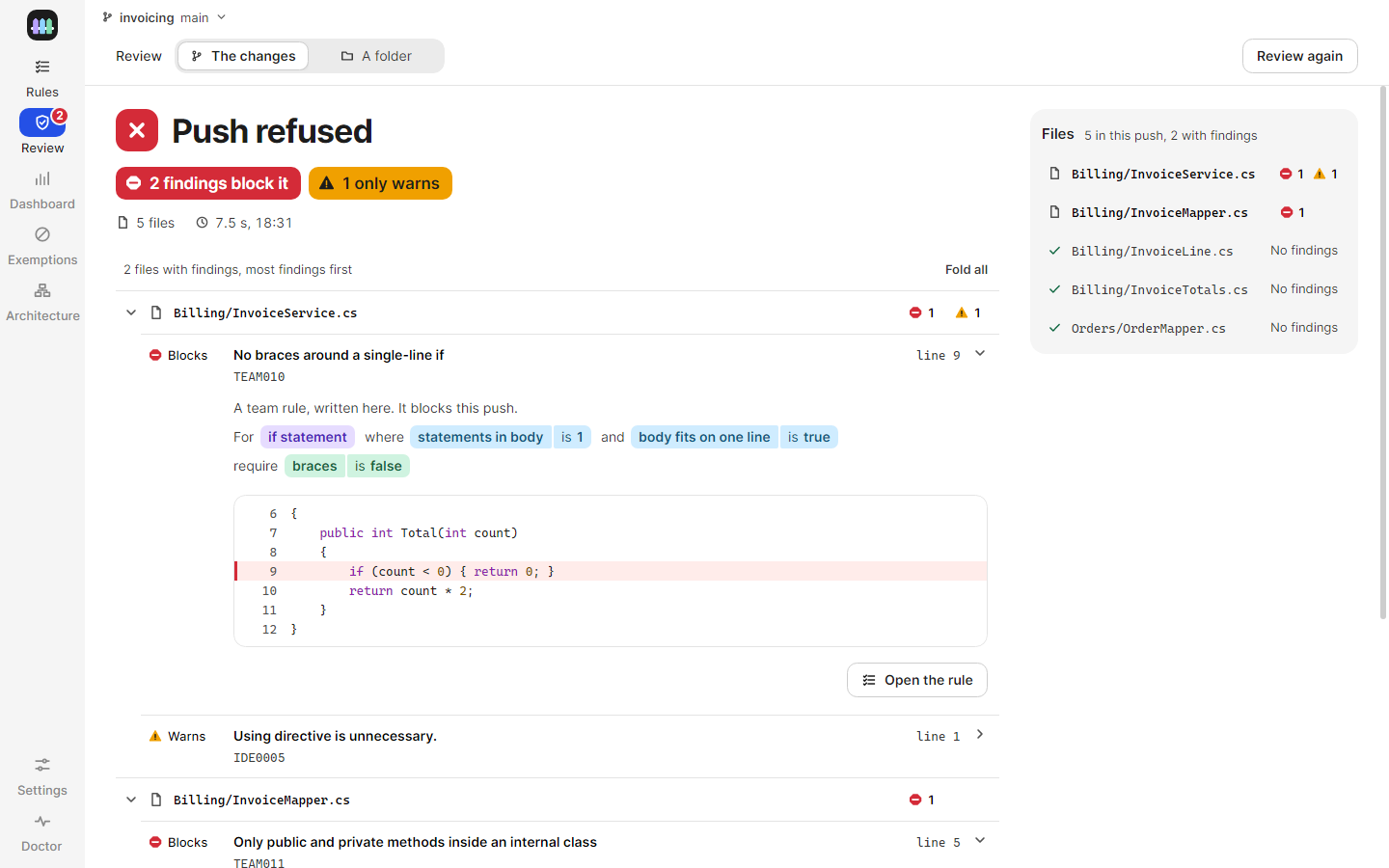
The review
What the push would send: the verdict, every finding under its file with the code around it, and the files of the push. The same review the command line prints.
What a rule is
A rule is a sentence
It says what it is about, where it applies and what the code must be. You write it in the app, with one command, or in commitfence.json.
$ commitfence rules add TEAM010 --for if-statement --title "No braces around a single-line if" --where statementsInBody=1 --where bodyFitsOnOneLine=true --require braces=false
{ "rules": [ { "id": "TEAM010", "language": "csharp", "for": "if-statement", "severity": "block", "title": "No braces around a single-line if", "where": { "statementsInBody": 1, "bodyFitsOnOneLine": true }, "require": { "braces": false } } ]}What it judges
Rules the team wrote, and rules it already had
Rules as data
Each rule is an entry in commitfence.json: what it is for, where it applies, what the code must or must not be. Blocks the push, or only warns.
Your .editorconfig
The dotnet_diagnostic severities your .editorconfig sets are read too, and shown as blocking or warning. CommitFence never writes that file.
Structure rules
Say which parts of the code may use which. A push that makes that worse is refused.
Only what the push touches
An old breach in code the push leaves alone is let go, so a rule can be introduced without a clean-up first.
Judged on facts
The changed projects are built in a private copy with your own compiler, so a rule about what a type really is, or what a call refers to, is not a guess.
Never a pass it could not give
When a review cannot be completed it says so and the push is not allowed.
Download
The app with the command line, or the command line alone
Free and open source. Each file is the one of the release the version line names, from GitHub.
Version 1.0.0.0 · 23 November 2026 · What's new
| System | The app, with the command line | The command line alone |
|---|---|---|
| Windows (x64) | CommitFence-win-x64.zip | commitfence-cli-win-x64.zip |
| Windows (ARM) | CommitFence-win-arm64.zip | commitfence-cli-win-arm64.zip |
| Linux (x64) | CommitFence-linux-x64.tar.gz | commitfence-cli-linux-x64.tar.gz |
| macOS (Apple silicon) | CommitFence-osx-arm64.zip | commitfence-cli-osx-arm64.tar.gz |
| macOS (Intel) | CommitFence-osx-x64.zip | commitfence-cli-osx-x64.tar.gz |